
The short answer
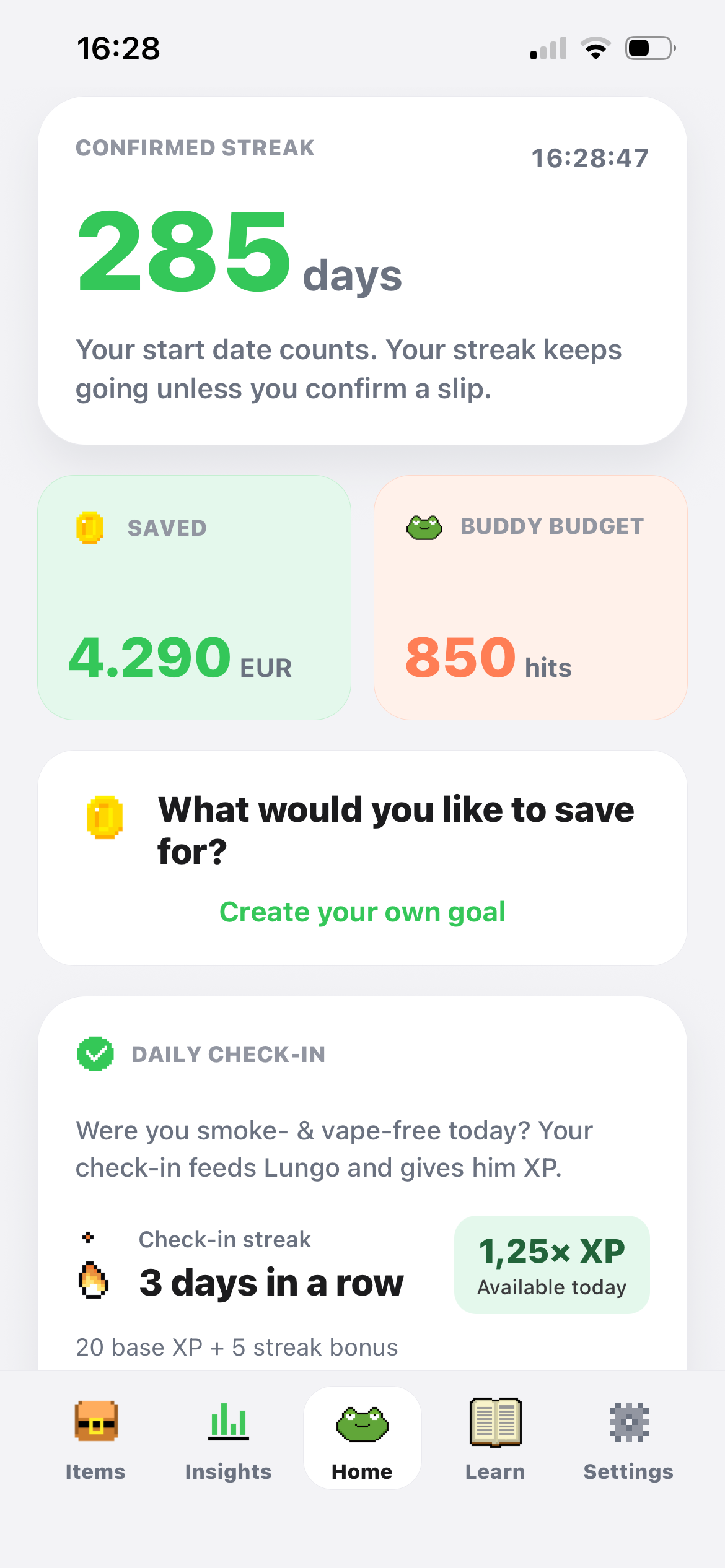
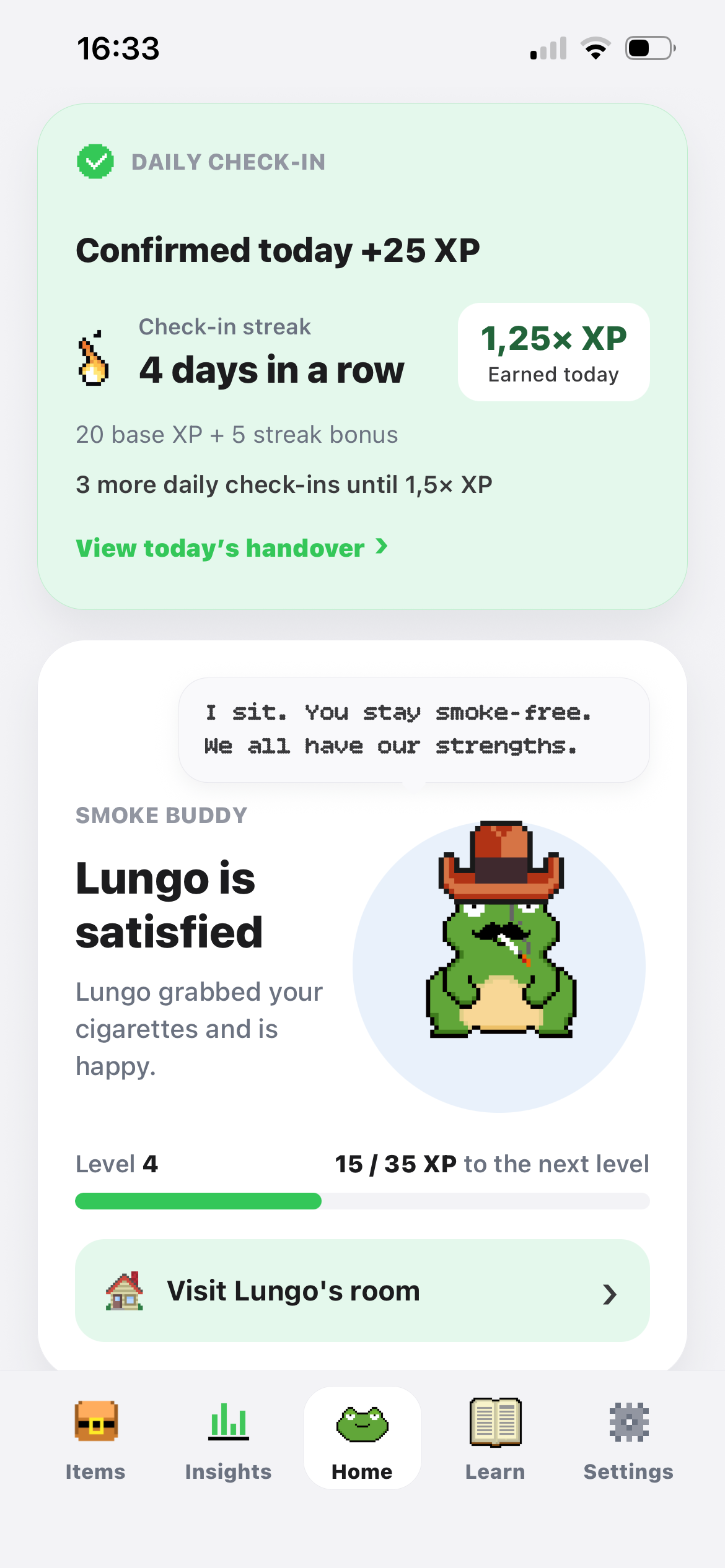
Lungo is a Kwit alternative for people who want a pixel-frog companion at the centre of their quit routine. Daily check-ins turn avoided cigarettes or puffs into progress for Lungo. XP, streaks and cosmetic items make that progress part of a little world you can personalise, with tracking and craving tools alongside it. When cravings hit, play Fly hunt to keep your hands busy and take your mind off smoking or vaping.
Kwit also supports vaping, breathing exercises and playful motivation. [2] The choice is about which experience fits you. Both apps give you more than a counter; this page helps you compare the kind of interaction you want to return to.
Lungo vs Kwit: compare the experience around your cravings
These are current public product descriptions, not results from a hands-on test. Lungo information comes from our product and store descriptions. Check your platform and plan for exact access to features. [5] [6]
On a small screen, swipe the table sideways.
| What you want | Lungo | Kwit |
|---|---|---|
| Main approach | Pixel companion, daily check-in and visible game progress. | Provider-described CBT-informed support and gamification. [1] [3] |
| Playful motivation | XP, streaks, achievements and cosmetic items for your frog. Fly hunt for distraction. | Levels and motivational cards. [2] [3] |
| Craving reflection | Trigger, intensity and outcome log; deeper insights with Plus. | Diary for cravings, cigarettes and the quit journey. [1] |
| Breathing | Guided one-minute breathing exercise. | Provider-described breathing exercises. [2] |
| Vaping | Vape-only or combined smoking and vaping setup. | Vaping and nicotine-consumption tracking. [2] |
| Nicotine replacement | Progress tracking for smoking and vaping. | Tracking for nicotine replacement products. [1] |
| Access and ads | Ad-free core; optional Lungo Plus. | Ad-free, with a free offer and optional Premium. [1] |
| Phones | iOS and Android. | iOS and Android. [1] [4] |
Several features overlap, so a simple tick list only gets you part of the way. Look at what happens when you open the app on an ordinary day, record a difficult moment or want a short pause.
Try a daily check-in with LungoLungo Arcade · Fly hunt
A game to take your mind off cravings
Feel like smoking or vaping and want something to do with your hands? Open Fly hunt and tap the flies with Lungo. The little game gives your attention a new task: catch the next fly and try to beat your own record.
Play a short round when you want an active distraction. You can also use the breathing exercise or record the urge afterwards. Choose what suits the moment; there is no need to wait for the next daily check-in to open the game. [6]
Download Lungo and try Fly hunt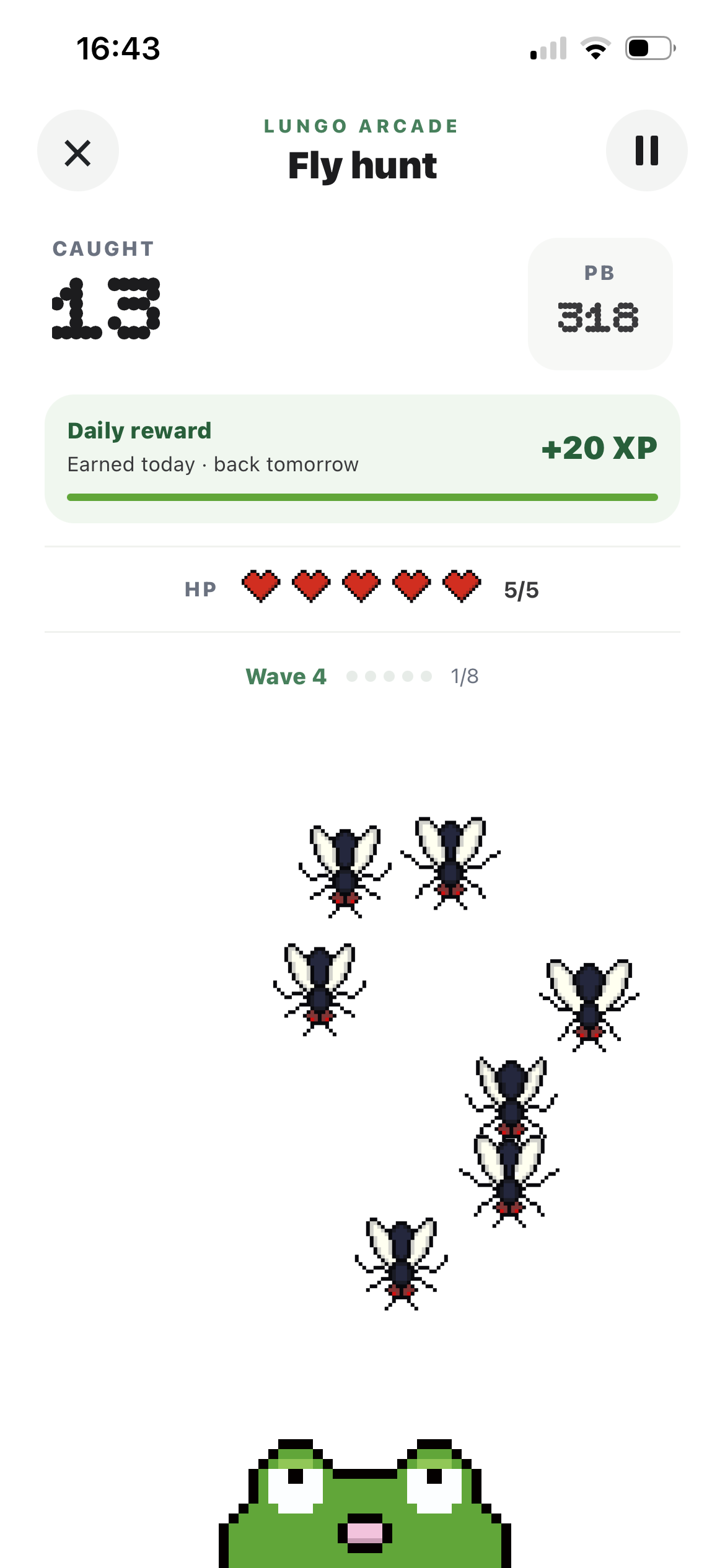
Understanding the approach before choosing the app
Kwit describes its approach in terms of cognitive and behavioural therapies and game elements. [1] [3] If that framework matters to you, explore the provider’s explanation and the content available in your edition. It is a concrete reason to consider Kwit, rather than treating it as a plain timer.
Lungo’s focus is a small daily interaction with a character. You see your progress, hand over avoided units and decide how to personalise the frog’s world. The aim is to give the routine personality while keeping practical information close at hand.
This page compares product experiences. It does not describe Lungo as a CBT treatment or claim that a particular game mechanic produces the same results as a therapeutic programme. You can choose an experience you enjoy while getting professional support separately when you need it.
Think about what you want this week: a way to explore your habits, something to open during an urge, or a reason to notice progress each evening. Those needs can coexist, but one may be your starting point for trying a different app.
From “I had a craving” to a record you can use
A useful entry does not need to be long. In Lungo, record what triggered an urge, how intense it felt and whether you made it through. “Coffee after a meeting” is a different situation from “waiting for the train”, even if the intensity is similar. Your notes give the numbers context.
Kwit’s public description also includes a diary for recognising cravings and recording the journey. [1] The choice is not between reflection and no reflection. Try the logging style and decide whether you would use it honestly when the day is difficult, not only when everything is going well.
Here is one way you could use Lungo: log an urge after lunch, note the social setting and come back later to look at the entry. Over time, your record can give you material to think about. Deeper craving insights are optional Plus features; basic logging is part of the free core.
Our smoking triggers guide includes a planner for a familiar situation and a possible next action. Use it to think through your own example before downloading. A record is a tool for reflection, not a diagnosis or a score you need to keep perfect.
Choose what you want to do during a short break
Lungo offers a guided breathing exercise lasting one minute. You can follow it, put down the phone and choose your next action. The timer measures the exercise; it does not promise that a craving will disappear after sixty seconds. Try the web breathing timer to get a feel for this format.
Kwit also describes breathing exercises on its website. [2] Breathing is therefore a shared category, not an exclusive Lungo feature. The useful comparison is whether you like the guidance, the surrounding screens and how easily the tool fits into the moment you want to use it.
A daily ritual with something personal to build
Cravings are only one reason to open an app. On an ordinary evening, you might want a small acknowledgement of what you did that day. Lungo gives that moment a character and a short interaction:
- 1
Set your own starting point
Choose smoking, vaping or both and enter your previous habits. The tracker uses that context for progress and savings. Start with the habit you want to change, rather than an arbitrary target copied from someone else.
- 2
Hand over the units you avoided
The daily check-in passes avoided cigarettes or puffs to Lungo in his pixel world. There is no real tobacco involved. It is a playful acknowledgement of your real effort outside the app.
- 3
See several kinds of progress
Streaks, XP and achievements give you different ways to see the journey. You can enjoy them without making the score a judgement of your worth or expecting every day to bring a big milestone.
- 4
Make the little world yours
Virtual savings unlock cosmetic items for the frog and his rooms. Choose something you like, then get on with your evening. Your actual money stays yours; the virtual shop does not pay out cash.
Try attaching the check-in to something you already do, such as finishing dinner. This is a usage example, not a tested treatment timetable. If you enjoy returning to a familiar character, it is a good reason to explore Lungo’s free core.
Vaping and nicotine replacement: check which record you need
Both apps describe support for a vaping-related journey. Kwit also describes following nicotine replacement products and nicotine consumption. [2] Those records can matter to people whose needs go beyond a smoke-free or vape-free streak.
Lungo lets you choose cigarettes, vapes or both and set up your previous use. The Lungo vaping page explains that experience. This comparison does not claim an equivalent programme for tracking patches, gum or medication. Keep any treatment-related record you need, and discuss treatment changes with a qualified professional.
Before moving between apps, save dates and information you care about. Do not assume a different app will import your history or translate one tracking format into another. Your previous consumption and purchase figures also affect savings estimates; the vaping calculator and smoking calculator let you review your inputs.
Which experience would you use tomorrow?
Try Lungo if…
You want progress to have a familiar face
A pixel frog, collecting items and a short daily handover sound inviting. You want smoking or vaping tracking with craving tools nearby, and a small world you can make your own. You can try that routine without committing to Plus.
Consider Kwit if…
Its framework and tracking match your priorities
You value its described behavioural approach or want its nicotine replacement and consumption records. Check those functions in the version available to you. Keep a routine that already meets your needs, rather than switching for the sake of a new design. [1]
A good comparison starts with a feature you will actually use. Pick one situation, such as an evening check-in or logging an urge, and explore how Lungo handles it. You do not need to delete an existing record just to meet the frog.
Both apps describe ad-free use; compare the included tools
Kwit’s Google Play description presents a free, ad-free offer with optional Premium. [1] If you want an ad-free app, both products deserve consideration. Check which tools belong to your current edition, because a free download does not mean every feature is included.
Lungo’s free core includes your buddy, daily check-ins, streaks, savings, craving logging and breathing exercises. Optional Plus adds deeper craving insights, the Plus Coach, exclusive cosmetics and extended calendar history. Lungo works locally on your phone; cloud backup is optional. Read the privacy information for the account and consent details. [5] [6]
No exact subscription price is quoted here. Store, country, plan and current offers can differ. Look at the purchase screen for the offer available to you, and start by deciding which parts of the free routine you want to use.
Questions about this Kwit alternative
Does Kwit use gamification too?
Yes. Its science page describes levels, and its product information includes motivational cards. Lungo’s difference is its particular pixel frog, daily handover and cosmetic world. Rewards and game elements are not exclusive to Lungo. [2] [3]
Can I use Lungo when I am quitting vaping?
Yes. Choose vaping or a combined smoking and vaping setup. Your previous habits give the tracker its context. If you need a more specific nicotine-consumption record, check that requirement separately before changing apps.
Is Lungo a CBT treatment?
No. We describe it as a companion for tracking, motivation, reflection and cravings. This page does not claim that the frog or its rewards provide cognitive behavioural therapy, or replace medical or therapeutic advice.
Do I need Plus for craving logging and breathing?
No. Those tools are part of the free core. Plus adds optional extras such as deeper craving insights and the Plus Coach. You can learn the basic routine before deciding whether the additional features interest you.
Is Lungo proven more effective than Kwit?
No head-to-head result is claimed here. Lungo has no published clinical quit-rate trial. This is a comparison of product features and usage preferences, not evidence that changing apps increases your chance of quitting.
A small ritual with a little personality
Meet the frog. See what your progress can build.
Try Lungo’s free core: a short daily check-in, tracking for your habit and practical craving tools. Find out whether this is an experience you want to come back to tomorrow.


Free core · Optional Lungo Plus · iOS and Android
Sources and how we compared
Written by the Lungo team. Official product and store information was checked on 5 November 2026. Kwit’s approach is described as presented by its provider; no comparative clinical outcome is claimed. Feature access can vary by platform and plan. Missing public information is not proof that a feature is absent. We did not test every Kwit feature. This page has not been medically reviewed. Lungo is a companion, not a medical treatment or a replacement for professional advice. Fly hunt information and screenshot added on 6 November 2026.